Worktrees for impatient people
Have you ever found yourself waiting for an agent?
I have, many times, and it’s happening more often. Not long ago, agents couldn’t do much on their own, so they handed back control quickly. Now they can work through a whole task by themselves, and that can take a long time. To fill the wait, I started running several at once, and they soon got in each other’s way. Fortunately, there’s an answer: Git worktrees.
Agents work for longer
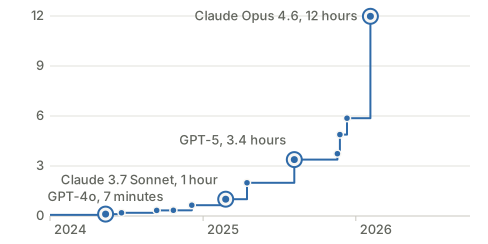
Agents can now take on far bigger jobs than they could a couple of years ago. METR, a research group that evaluates AI models, measures how complex a task an agent can handle by how long the same task takes a skilled person. In May 2024, the best model could manage about seven minutes’ work. By February 2026, it was up to about 12 hours’.
Agents can now take on tasks that last hours
So now that you can delegate complex, long-running tasks to agents, can you sit back and relax while they do all the work? You can. Or you can get on with the next task, and that’s where the trouble begins.
Early squabbles
My first attempts at wrangling several agents at once ended in conflict: not between me and the agents, but between the agents themselves. I’ve been writing software for years, usually alongside many other people, but my own machine was always mine alone. Now that I have coding agents, it can be like a team sharing one keyboard, all changing things at once.
One agent’s edits get tangled up with another’s, and when you try to open a PR for one piece of work, the others’ uncommitted changes get in the way. Eventually, I asked the agent how to avoid this conflict, and it suggested Git worktrees.
One worktree per agent
As the ancient proverb goes: give four agents one checkout and they’ll squabble all day. Give each its own worktree and they’ll work in peace.
A Git worktree is a second working directory for the same repository, with its own branch and files but shared history. Give each agent its own, and its changes stay out of the others’ way until you merge them.
I add a .worktrees directory to each project, tell Git to ignore it, and add a rule to AGENTS.md telling agents to make each change in a new worktree inside that directory. Doing it this way keeps things consistent across all the coding tools I use.
Worktrees took off with agents
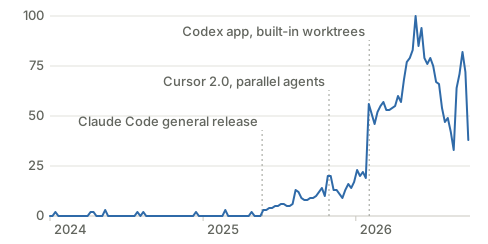
Worktrees have been in Git since 2015, but I’d never come across them until I started coding with agents. I don’t seem to be the only one: interest in them has exploded since agents took off. Searches nearly tripled in the week the Codex app launched with built-in worktrees.
Searches for worktrees took off with coding agents
With worktrees now built into Claude Code and Codex, I expect them to become the norm. It’s hard to see why you wouldn’t use them.
What worktrees don’t solve
Worktrees stop agents editing each other’s files, but there are still a few things to watch out for:
- Shared resources are the main problem. Anything outside the repository is still shared, and that’s where agents working at the same time can break each other’s work. For example, if the worktrees share a local database and one agent changes its schema, it may break the others’. If a piece of work will change something shared, give its worktree its own copy. If it only touches code, there’s nothing to worry about.
- Merge conflicts still happen. Agents that change the same code produce PRs that conflict, as people’s do. Agents are usually good at resolving them, but it helps to keep each piece of work small and tightly scoped. It’s tempting to keep a session going as you discover more to do; it’s better to close it off and start a new one.
- Ignored files don’t come with a new worktree. A fresh worktree has no
.envand no installed dependencies. Add copying the config and installing dependencies to theAGENTS.mdrule, and the agent will set up each worktree for you.
No free lunch
As you multiply what your agents get done, you also multiply the demands on yourself. Once worktrees have removed the technical barriers, the limit is your own ability, and appetite, to switch context: reading each agent’s response, deciding what it should do next, then moving on to the next. Run too many and their responses start to stack up.
Having your own army of agents might sound exciting, but someone still has to manage it. I’d recommend it. Just don’t be surprised when, instead of waiting for your agents, you find them waiting for you.
Further reading
- METR, Task-completion time horizons of frontier AI models, updated September 2026. The data behind the first chart, with METR’s method and caveats.
- Google Trends, worktrees, accessed 8 October 2026. The data behind the second chart.
- Git, git-worktree, accessed 13 October 2026. The reference for creating, listing and removing worktrees.
- Anthropic, Run parallel sessions with worktrees, accessed 13 October 2026. How Claude Code’s built-in worktree option works.
- OpenAI, Git worktrees, accessed 13 October 2026. The same for Codex.
- AGENTS.md, accessed 13 October 2026. The open format for instructions to coding agents, where I keep my worktree rule.